
Centralized business software for desktop, web, and mobile apps.
Brilogy Framework is a cross-platform application framework that connects desktop software, web portals, and mobile apps to one centralized database. Already powering Axeium in healthcare and SHPIS in oilfield operations, it helps organizations replace disconnected systems with a single source of truth.
Why organizations outgrow disconnected desktop, web, and mobile systems
When each platform stores or shows information differently, operations slow down, reporting becomes unreliable, and staff lose confidence in the data.
Desktop, web, and mobile tools that don't share data with each other.
Different systems show different versions of the same information.
Field teams and end users can't access the data they need on the go.
Staff waste time switching between disconnected applications.
What Brilogy Framework is: one shared database behind every application
Brilogy Framework unifies operations through a centralized database that powers desktop, web, and mobile applications at the same time. Every record, update, workflow, and user interaction stays aligned across all platforms.
Desktop, web, and mobile applications that share one database
Every application built on Brilogy Framework reads from and writes to the same centralized database. Changes made by admins, office staff, field teams, or end users are available everywhere without duplicate data entry.
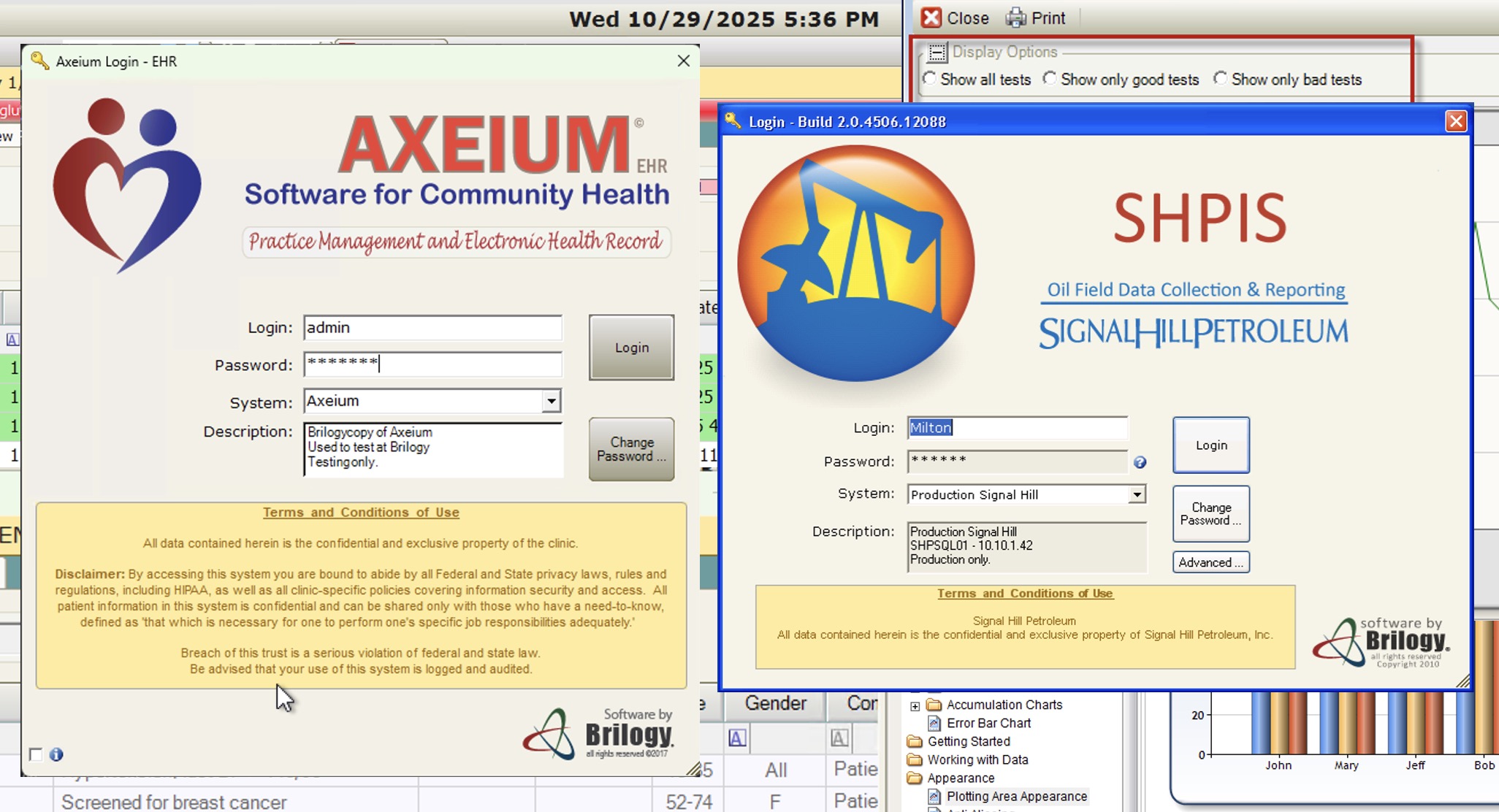
Desktop App
The full-featured workstation for admins & power users
Complete desktop application for administrators and operational staff. Deep access to data management, configuration, reporting, and all system modules.
- Full data management & configuration
- Advanced reporting & analytics
- User & role administration
- Workflow automation & rules
- Offline-capable with sync
- Module-based extensibility
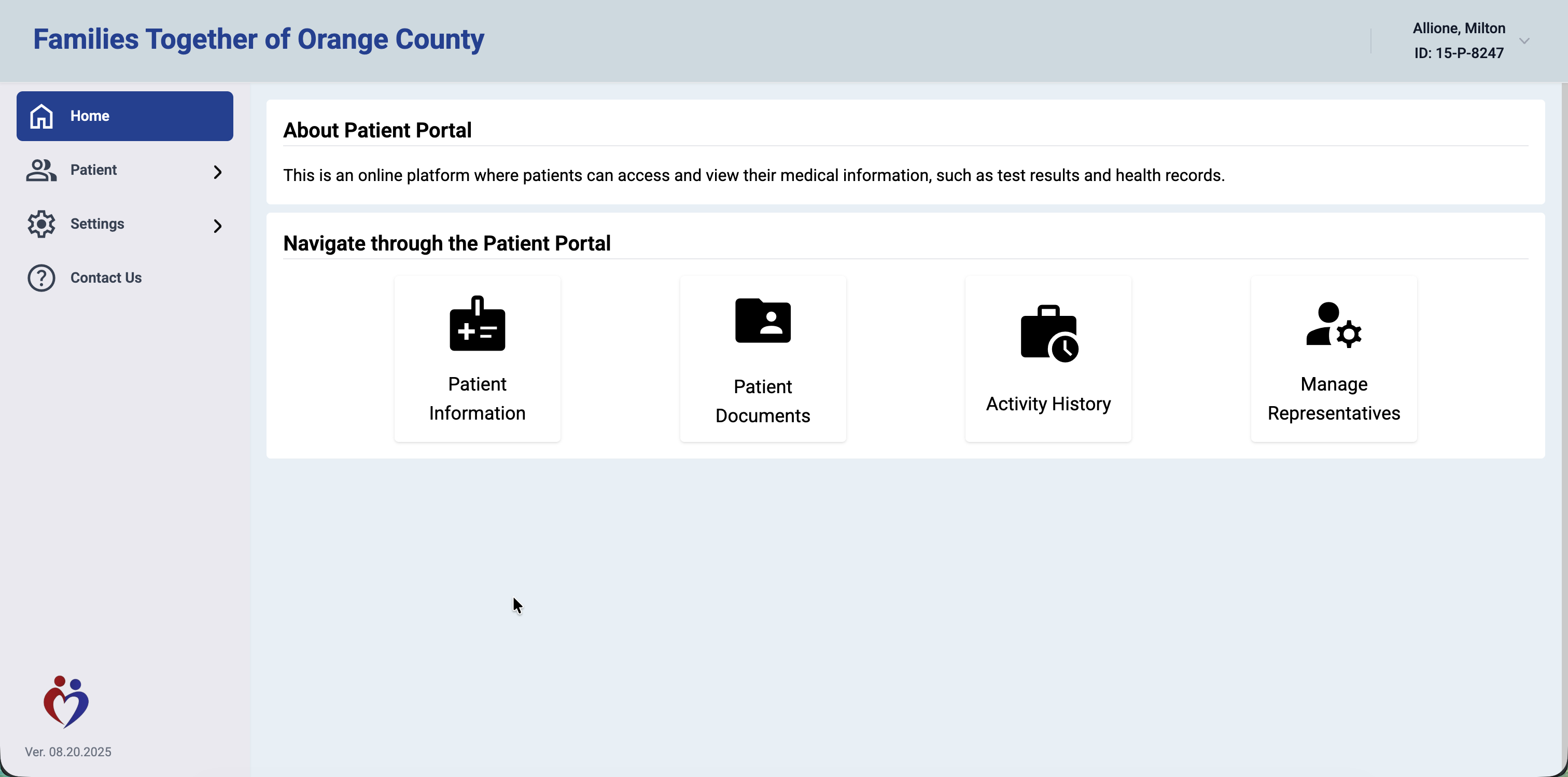
Web Portal
The portal for remote access & end users
Browser-based application for end users and remote staff. Lighter modules focused on self-service, dashboards, and day-to-day tasks — no installation required.
- Remote data access & dashboards
- Self-service portal for end users
- Secure messaging & notifications
- Document & report viewing
- Lightweight task management
- Works on any modern browser
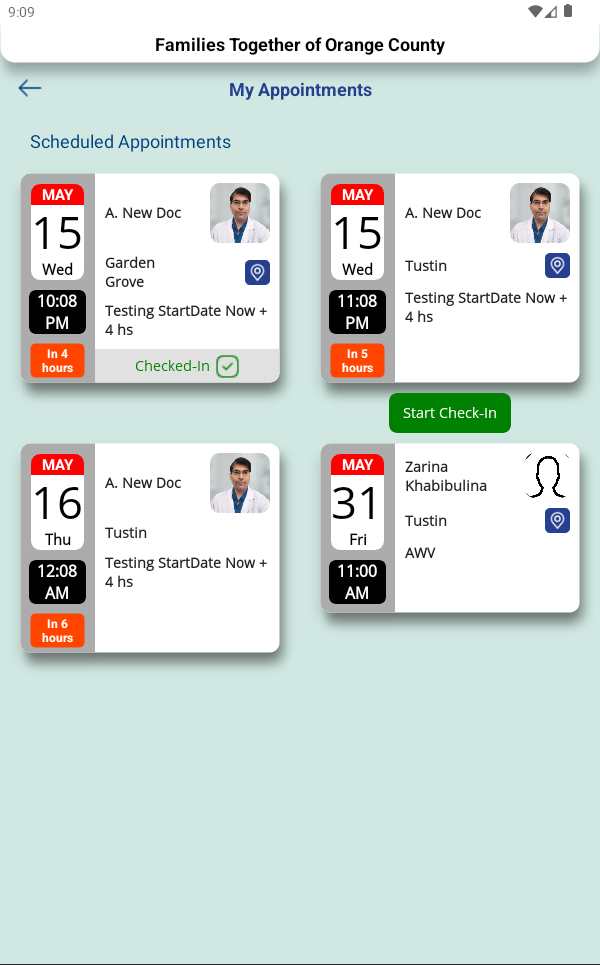
Mobile App
Operations in your pocket
Native mobile app for field teams and users on the go. Push notifications, quick data capture, real-time access to key metrics, and approvals from anywhere.
- Push notification alerts
- Field data capture & check-in
- Quick access to key metrics
- Secure in-app communication
- Location-aware features
- On-the-go approvals & tasks
Who Brilogy Framework serves across your organization
Different roles need different interfaces, but they should not need different data sources. Brilogy Framework gives each audience the right experience while keeping every workflow tied to the same operational records.
Desktop-first control center
Administrators & System Owners
Best for teams that need full visibility into records, permissions, workflows, reporting, and operational setup from a high-control workstation experience.
- Configure modules, users, and permissions from one place
- Manage reporting, auditing, and business rules centrally
- Maintain system-wide consistency without manual reconciliation
Desktop and web for daily execution
Operations & Office Staff
Supports staff who need reliable shared records, day-to-day task handling, document access, and smooth coordination across departments.
- Reduce duplicate data entry across internal tools
- Work from shared records that stay current across platforms
- Handle tasks, approvals, and reporting with less friction
Mobile workflows with real-time sync
Field Teams & Mobile Users
Built for users who capture data away from the office, need quick approvals, receive alerts, and must stay connected to operational updates in real time.
- Capture field data and updates from mobile devices
- Receive alerts, notifications, and on-the-go approvals
- Keep field activity aligned with office and admin teams
Browser-based self-service access
End Users, Clients & Portal Audiences
Ideal when customers, patients, partners, or external users need secure access to their own data, documents, dashboards, or self-service flows.
- Provide secure portal access without desktop installation
- Support self-service workflows and status visibility
- Extend operational data to external audiences safely
How the centralized database, API layer, and apps work together
Brilogy Framework uses a shared data layer and API services so desktop, web, and mobile applications can deliver role-specific experiences without fragmenting records, permissions, or reporting.
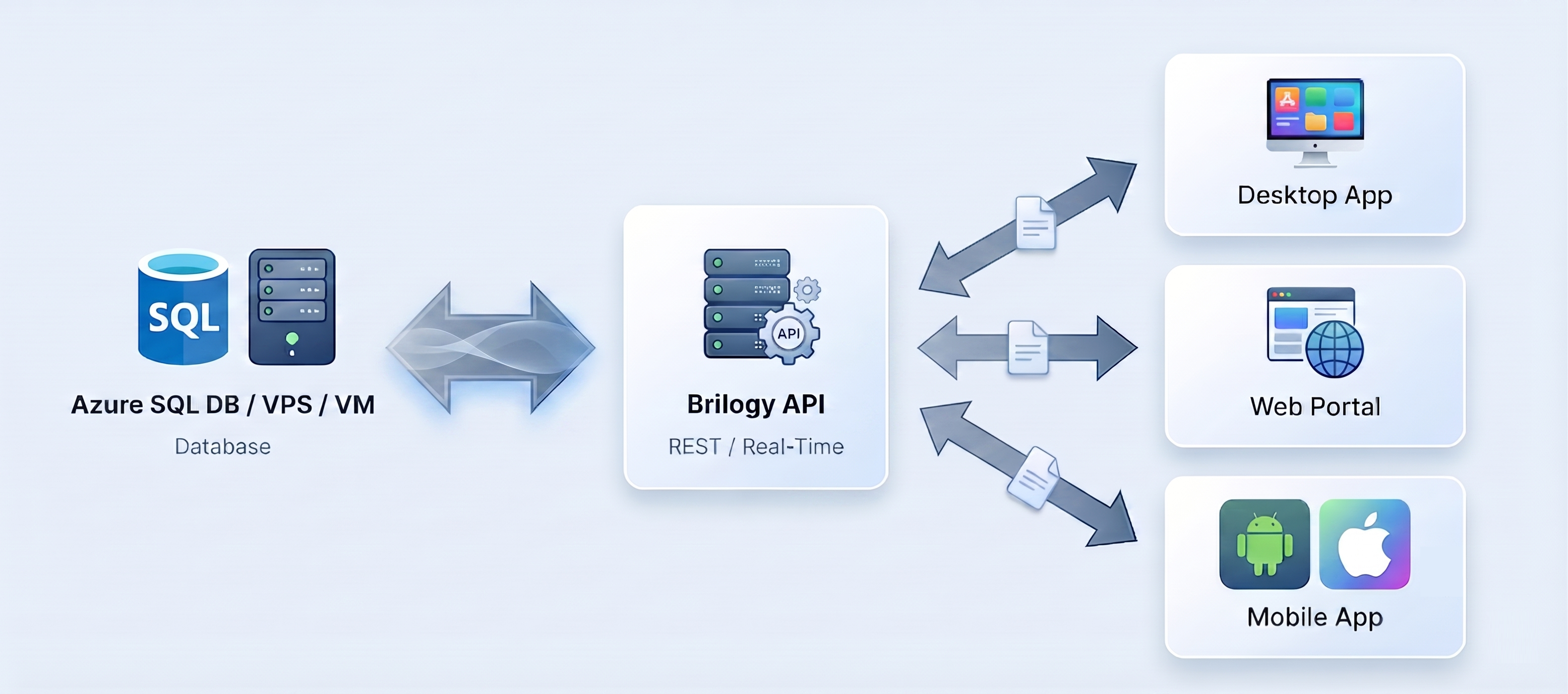
How Brilogy Framework works from deployment to daily operations
The rollout is straightforward: connect the database, configure the desktop application, enable web and mobile access, and operate from one shared data model.
Set Up Your Central Database
Deploy your database on Azure, a VPS, or your own Windows Server VM. MSSQL is the preferred engine, but Brilogy Framework supports other options that run on Azure or Windows Server.
Configure the Desktop App
Install the Desktop application on admin workstations. Configure modules, roles, workflows, and business rules tailored to your operation.
Activate Web & Mobile
Enable the Web Portal for end users and remote access, and the Mobile App for field teams. Both connect directly to your central database.
Operate as One
All three platforms share the same data in real time. Updates on Desktop appear instantly on Web and Mobile — and vice versa.
Core capabilities in a centralized business software framework
These features are designed for organizations that need secure data access, cross-platform consistency, and operational flexibility without managing separate systems.
- A single source of truth for operational records, reporting, permissions, and workflows, with MSSQL as the preferred engine.
- Changes made on desktop, web, or mobile are reflected across every platform so teams always work with current information.
- Permissions adapt by role and platform so administrators, staff, field teams, and end users each see the right data.
- Configurable modules, layouts, and workflows make it easier to tailor each deployment to the operation instead of forcing teams into rigid software.
- Purpose-built iOS and Android experiences support field data capture, alerts, approvals, and work away from the office.
- A browser-based portal gives end users and remote teams access to dashboards, documents, and workflows without software installation.
Who Brilogy Framework is for and how teams use it
Brilogy Framework adapts to industry-specific workflows. The same centralized architecture can support clinical records, field operations, logistics, service delivery, manufacturing, and other data-heavy environments.
Healthcare — Axeium
Electronic health records, patient scheduling, billing, patient self-service portal, and mobile appointment management.
Energy & Oilfield — SHPIS
Well monitoring, production data tracking, field reporting, equipment management, and real-time operational dashboards.
Any Industry
The modular framework adapts to logistics, manufacturing, services, and any operation that needs centralized data across multiple platforms.
Business outcomes of using one database across every platform
The value is not just technical. Centralized data improves speed, reduces manual work, and creates more reliable visibility across the organization.
Single Source of Truth
One database eliminates data duplication and conflicting records
Multi-Platform Access
Desktop, Web, and Mobile — each optimized for its audience
Reduced IT Overhead
One database to maintain, backup, and secure instead of many
User Engagement
End users get self-service access; field teams get mobile tools
Faster Decisions
Real-time data sync means everyone always sees the latest information
Common questions about centralized database software, deployment, and rollout
These are the questions operations leaders, IT teams, and buyers typically ask when evaluating a shared desktop, web, and mobile software platform.
What is Brilogy Framework?
Brilogy Framework is a centralized business software framework that connects desktop, web, and mobile applications to one shared database. It is designed for organizations that need different user experiences by platform without fragmenting data, reporting, or workflows.
Where is the data stored?
All data is stored in a centralized database. MSSQL is the preferred engine, but Brilogy Framework also supports other database options that can run on Microsoft Azure or a Windows Server VM. You choose the deployment that fits your infrastructure.
How does data sync between platforms?
All three platforms — Desktop, Web, and Mobile — connect directly to the same database. There's no replication or sync delay. When someone updates a record on Desktop, it's immediately available on Web and Mobile.
Who is Brilogy Framework for?
It is a strong fit for organizations that have office staff, administrators, field teams, or end users working across different platforms but needing the same underlying data. That includes healthcare, energy, logistics, manufacturing, and service operations.
Can we start with Desktop and add Web and Mobile later?
Yes. Brilogy Framework is designed for incremental adoption. Most organizations start with the Desktop app, then activate Web and Mobile when they're ready. Each platform connects to the same database, so there's no data migration.
What's the difference between the Web Portal and the Mobile App?
The Web Portal is browser-based and focuses on dashboards, self-service, and remote access. The Mobile App adds native features like push notifications, field data capture, location awareness, and on-the-go approvals.
Can Brilogy Framework replace disconnected internal tools?
Yes. It is specifically designed to replace fragmented desktop tools, portals, spreadsheets, and mobile workflows with one centralized data model and a coordinated set of applications for each user group.
How is Brilogy Framework deployed?
Deployments can run on Microsoft Azure, a VPS, or a Windows Server VM. The exact setup depends on your infrastructure, security requirements, and how you want users to access desktop, web, and mobile applications.
How long does rollout usually take?
Rollout timing depends on the number of workflows, modules, user roles, and integrations involved. Many teams begin with a desktop-first implementation and phase in web and mobile access after the core data model and workflows are established.
What industries does Brilogy Framework support?
Brilogy Framework is industry-agnostic. It currently powers Axeium for healthcare (EHR, patient portals) and SHPIS for energy (well monitoring, field reporting). The modular architecture adapts to any industry that needs centralized data across multiple platforms.
Request a tailored walkthrough of Brilogy Framework
Share a few details about your operation and we will show you how a centralized database, desktop software, web portal, and mobile workflows could fit your teams.
- See the full desktop, web, and mobile ecosystem in action
- Get a walkthrough aligned to your users, workflows, and deployment needs
- Understand whether Brilogy is a fit before committing to a larger evaluation
What happens after you submit
- We review your use case and platform needs.
- We follow up to schedule the most relevant walkthrough.
- We tailor the conversation around roles, workflows, and deployment options.
Tell us what you are evaluating
Most teams complete this in about 2 minutes.